The most popular advice about bad recordings is also the fastest way to ruin them: remove every trace of background noise. That approach confuses silence with quality. A clean voice still needs believable room tone, natural breaths, and the small acoustic details that make a person sound present rather than reconstructed.
Modern AI audio cleanup works best as a controlled restoration process. It can reduce noise, tighten reverberant dialogue, and separate overlapping sources, but every operation can damage speech if pushed too far. The practical target is intelligibility with authenticity, not absolute silence. A recording with mild, consistent ambience often feels more professional than one filled with metallic consonants and unnatural gaps.
Speech enhancement has been studied for more than 60 years, and frequency-domain monaural enhancement became an extensively researched field before deep learning changed the practical workflow. The modern shift has been from rules such as Wiener filtering toward supervised neural networks that learn how noisy speech relates to cleaner speech, as described in this overview of speech enhancement research. The techniques are powerful, but the engineer still has to decide how much processing the material can tolerate.
Table of Contents
- Why Cleaner Audio Is Not Always Better
- How AI Audio Cleanup Actually Works
- AI Methods Versus Traditional Audio Repair
- A Practical AI Audio Cleanup Workflow
- Real Use Cases for Creators and Teams
- Common Pitfalls and How to Avoid Them
- Choosing the Right Tool and Settings
Why Cleaner Audio Is Not Always Better
A listener doesn't experience noise reduction as a number on a control panel. They hear whether the speaker sounds close, stable, and human. When an algorithm removes too much, the voice can develop watery movement, brittle sibilance, smeared consonants, or a hollow texture that becomes tiring over a long interview.
The problem is especially obvious when the background changes. A model may suppress a refrigerator hum successfully, then treat a breath, a soft “s,” or the decay of a room as unwanted material. The result can alternate between processed speech and unnaturally empty pauses. Mild room tone usually creates continuity. Artificial silence exposes the edit.
The noise floor has a job
I use the idea of noise floor comfort when judging a restoration. A comfortable noise floor is a subtle ambient bed that remains unobtrusive while giving the ear a stable acoustic environment. It doesn't need to be loud, and it shouldn't compete with speech, but removing it completely can make every pause feel disconnected.
That principle matters when preparing a recording device or meeting workflow. A poor microphone position can force any cleanup system to work harder, so it helps to review a practical Typist meeting capture setup before recording. Better distance, less handling noise, and a controlled room often produce a more natural result than aggressive repair after the fact.
Practical rule: If you notice the processing before you notice the speaker, reduce the intensity.
Three different problems need three different tools
Noise reduction targets relatively identifiable interference, such as HVAC rumble, hiss, or a computer fan. Dereverberation addresses reflections that have already blended with the voice. Source separation attempts to pull apart competing elements, such as dialogue and music or one voice from a complex mixture.
These processes aren't interchangeable. Noise reduction can lower a steady background, but it won't fully rebuild speech recorded in a reflective room. Dereverberation can bring words forward, but it may thin the voice if the room and speech are difficult to distinguish. Source separation can create a useful dialogue stem, yet separated material may contain residue or unfamiliar artifacts.
The best result preserves enough of the original acoustic identity to sound intentional. For podcasts, documentaries, interviews, and journalism, naturalness is part of fidelity, not a defect to be scrubbed away.
How AI Audio Cleanup Actually Works
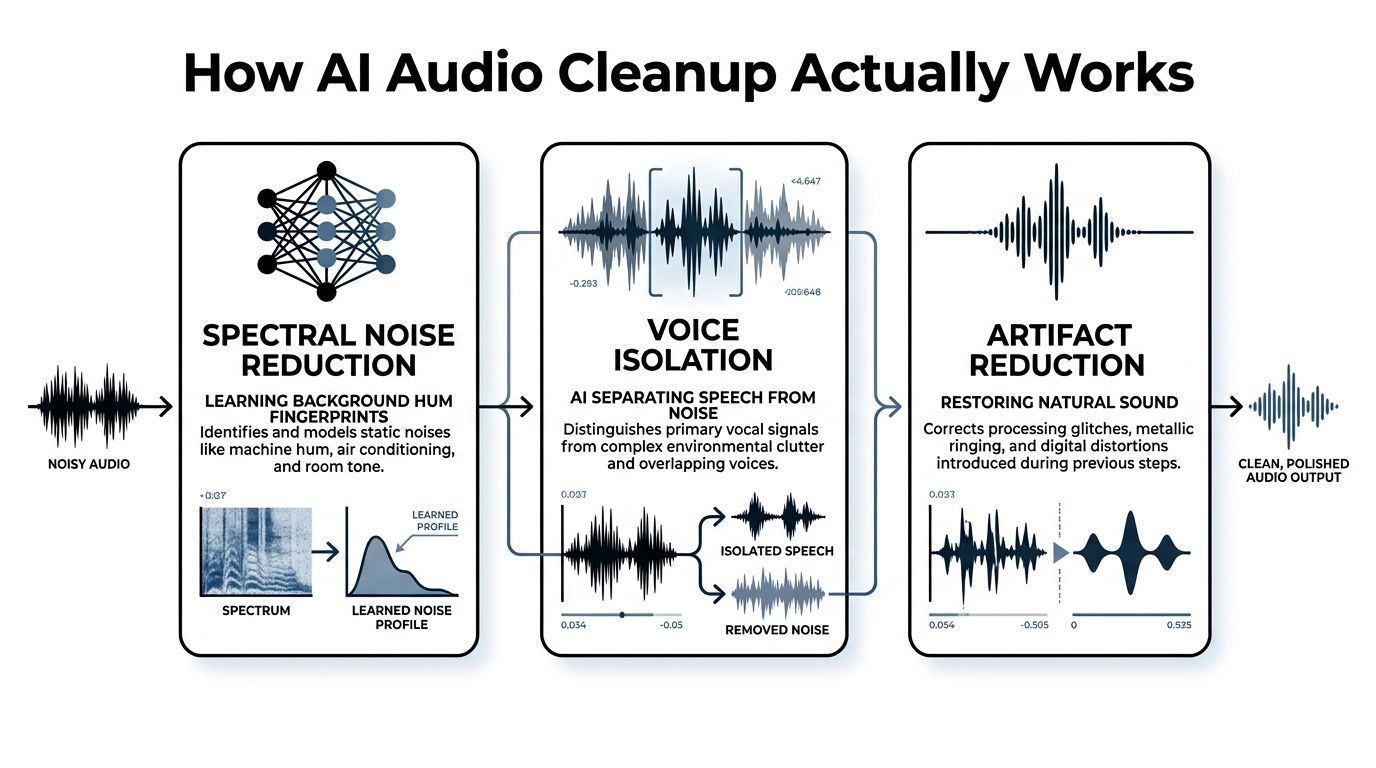
AI cleanup is a prediction system, not a smarter volume knob. Neural models examine short sections of audio, classify patterns associated with speech and unwanted sound, then estimate what to retain. During that process, the model must protect timing, pitch, transients, and the links between neighboring sounds. The aggressive setting may remove more noise, but it also gives the model more opportunities to mistake breath, consonants, or room tone for a defect.
Spectral noise reduction
A neural network can learn the spectral fingerprint of a background hum, keyboard pattern, or ventilation system. It estimates how much of that pattern appears in each time-frequency region and attenuates it frame by frame. For non-engineers, Photoshop's content-aware fill is a useful comparison. The system does not erase one fixed frequency band. It makes a changing estimate of what belongs to the background and what belongs to the foreground.
This approach performs well when the unwanted sound has a recognizable pattern and the speech remains distinct. It becomes less reliable when noise overlaps speech frequencies, changes rapidly, or resembles the speaker's voice. Consonants and sibilants are especially exposed because they contain brief, high-frequency detail. A cautious mode may leave some hiss behind. An aggressive mode may remove the edge from words and create a dull, processed delivery.
Speech enhancement research tracks the shift from conventional suppression rules to neural mappings between noisy and clean speech in this PubMed review. Current tools can outperform fixed-rule processors in changing noise, but the result still requires careful auditioning. Compare the processed voice with the original at matched loudness. Loudness alone can make a harsher result seem cleaner.
Dereverberation estimates the room
Reverberation is not a separate layer behind the speaker. Reflections arrive at different times, combine with direct speech, and change the shape of vowels and consonants. A dereverberation model estimates the room's acoustic behavior, often represented by an impulse response, then reduces the reflected component.
The practical trade-off is similar to removing glare from a photograph. Words become easier to understand, yet excessive correction can make the voice flat. In audio, overcorrection often sounds dry, phasey, or detached from the visual space. Lower-quality settings may preserve a believable room while leaving some tail behind. That is often preferable to a voice that sounds pasted into silence.
Source separation unmixes competing sound
Source separation estimates individual components from a combined recording. A model may extract speech from music, vocals from a rough demo, or dialogue from traffic and crowd noise. Once sources are mixed, the system infers their identities from shared timing and frequency information. Training data teaches those distinctions, but difficult overlaps still produce residue, watery high frequencies, or missing syllables.
The INTERSPEECH 2020 Deep Noise Suppression Challenge marked an important collaborative milestone for real-time, single-channel speech enhancement and reflected the move toward DNN-based treatment of changing noise. Later benchmark work shows why architecture and objective matter. On VoiceBank+DEMAND, one ASE-TM model reached PESQ 2.98, compared with 2.37 for THF-FxLMS and 1.48 and 2.45 for listed deep-learning ANC baselines, as reported in this VoiceBank+DEMAND benchmark.
PESQ and STOI provide useful reference points. PESQ tracks perceived speech quality, while STOI focuses on intelligibility. CMGAN results on VoiceBank+DEMAND included PESQ 3.41 and STOI 96, among other reported measures, in this CMGAN evaluation. Metrics help compare systems. They cannot judge identity, emotion, breathing, or believable ambience, so the final decision still belongs to the listener.
AI Methods Versus Traditional Audio Repair
Traditional repair remains valuable because it gives the engineer direct control. A high-pass filter can remove low-frequency rumble without asking a model to interpret the whole recording. A notch filter can target one electrical tone. A gate or expander can shape pauses, and manual spectral editing can remove a single intrusive event with precision.
AI changes the economics of the first pass. In a difficult interview, it can identify speech across a changing background and produce a usable starting point quickly. That doesn't eliminate judgment. It shifts judgment from drawing every repair by hand toward selecting an appropriate model, reviewing artifacts, and deciding what should remain.
A hotel-lobby interview
Consider a long interview recorded in an echoey hotel lobby. The voice competes with reflections, HVAC noise, movement, and occasional transient sounds. A conventional chain might combine a high-pass filter, adaptive noise reduction, dereverberation, manual de-essing, clip gain, and detailed spectral painting. The engineer can achieve excellent surgical results, but the process demands repeated listening and careful automation.
An AI pipeline can provide a coherent first pass much faster, especially when the same treatment must be applied across many clips. The advantage isn't that AI always sounds better. It can preserve consonant timing more consistently than a careless chain, but it may also soften a laugh, misread a nearby voice, or create a watery tail in a difficult pause.
| Criterion | AI Audio Cleanup | Traditional Methods |
|---|---|---|
| Turnaround | Fast first-pass restoration across many files | Slower when each event needs individual attention |
| Skill ceiling | Depends on model choice, intensity, and artifact review | Very high, with direct control over frequency and time |
| Changing noise | Often handles non-stationary backgrounds more smoothly | Requires automation, multiple processors, or manual edits |
| Single intrusive event | May misinterpret or leave residue | Excellent for surgical spectral repair |
| Room character | Can reduce reflections quickly | Allows precise shaping, but demands more setup |
| Repeatability | Presets and batch workflows support consistency | Consistent chains work well, but source variation needs adjustment |
| Artifact control | Depends on conservative settings and A/B checks | Engineer can isolate the exact cause of a defect |
Choose by the failure you can tolerate
Use AI first when turnaround, volume, or changing noise is the main constraint. Use traditional repair first when one phone ring, click, or narrow tonal problem is the central issue. A hybrid workflow is often the most reliable: AI handles broad enhancement, then manual tools correct the remaining specific defects.
Don't judge the result in isolation. Put the cleaned voice back into the edit, with music, room tone, and picture. A slightly textured voice may sit naturally in a documentary, while an aggressively dry voice can sound detached even if its noise floor looks impressive.
A Practical AI Audio Cleanup Workflow
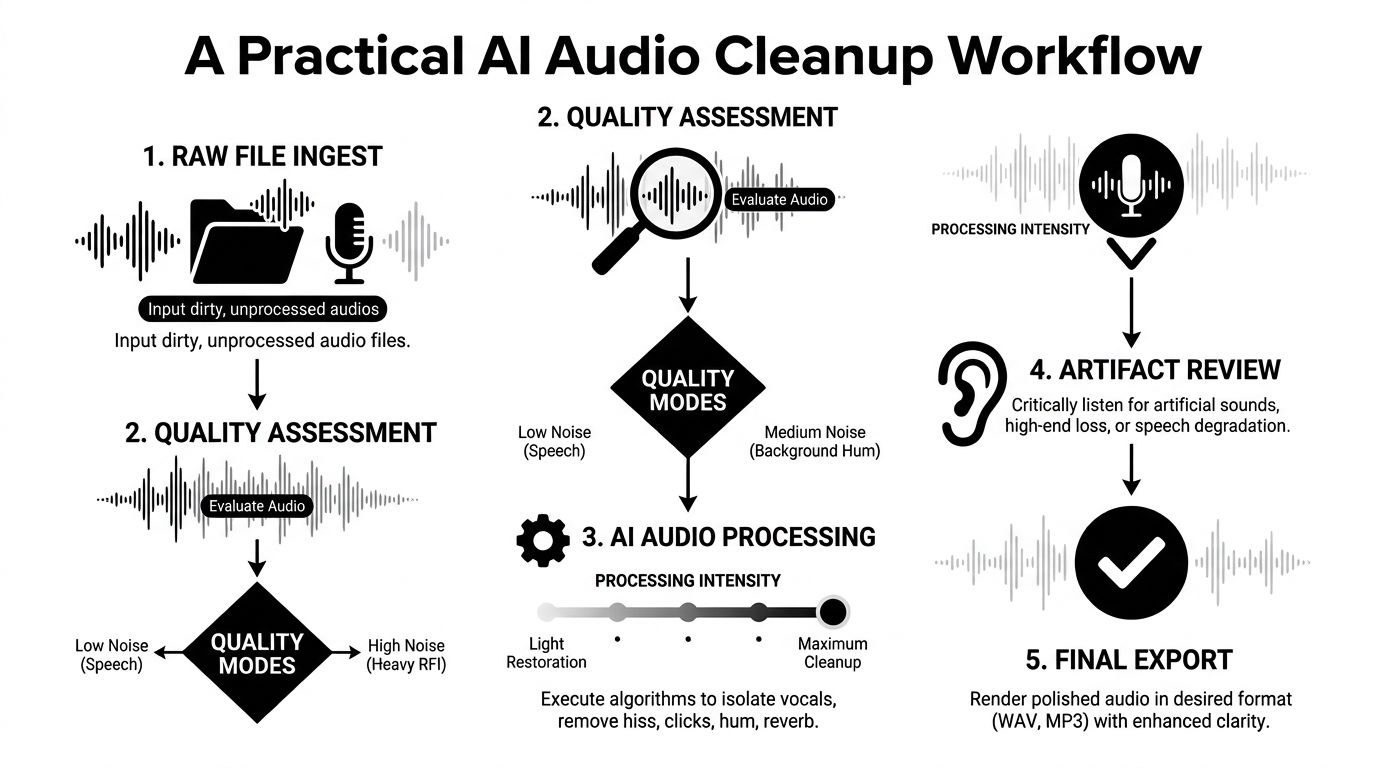
The fastest workflow isn't “upload and export.” It starts with diagnosis. Before processing, listen for the dominant problem, inspect the waveform for clipping, check whether the file is mono or stereo, and note whether the room sound is consistent. A clipped recording, severe overlap, or extreme reverberation may need a different strategy from ordinary hiss.
Start with a restrained pass
- Ingest the original: Keep the highest-quality source file available. Don't process a compressed preview if the camera, recorder, or editor can provide the original.
- Assess the material: Identify whether the main problem is noise, echo, competing sources, or speech level. A single clip may need more than one treatment, but processing everything aggressively at once makes diagnosis difficult.
- Select the quality mode: Choose a light mode for already-clean dialogue with mild interference, balanced for ordinary interviews and creator content, and aggressive only when the recording is difficult and the artifact risk is acceptable.
- Process one representative excerpt: Use a section containing speech, pauses, breaths, and the worst background condition. Don't judge a model from a clean opening alone.
- Review before committing: Compare the original and processed versions at matched loudness. Listen for consonants, breaths, room continuity, voice identity, and changes in emotional tone.
A ClearAudio-style workflow is useful for recurring projects because a team can upload audio or video, specify what to keep, and apply a repeatable quality mode. Batch processing and preset templates reduce repetitive setup, but they don't remove the need to audition a representative file before applying the same treatment widely.
For creators who are also assembling video, dedicated AI-powered YouTube editing tools can help coordinate dialogue cleanup with the broader edit. Keep the audio decision separate from visual automation, though. A fast video workflow can't compensate for a voice track that has been over-processed.
Apply treatments in an order that preserves options
Noise reduction usually comes before final EQ and compression because compression can raise the background between words. Dereverberation should be judged before adding brightness, since boosting the upper midrange can make residual reflections and sibilance more obvious. Source separation belongs early when the mix contains competing elements, allowing you to process the isolated dialogue or vocal stem independently.
Use A/B tests after each meaningful change. If the cleaned track sounds louder, lower its gain before comparing it with the original. Otherwise, the louder version will often seem “better” even when it has lost detail.
The video below can help visualize how AI-based editing fits into a broader creator workflow.
Finish with gentle manual EQ, clip gain, and compression only after the restoration sounds stable. Export a high-quality master before creating delivery versions for podcasts, video, or broadcast. Preserve dynamic range rather than forcing every pause and word to the same level, then check the final file on headphones, speakers, and the playback environment your audience is likely to use.
Real Use Cases for Creators and Teams
AI cleanup is most useful when the source is understandable but inefficient to repair manually. It gives the editor a strong starting point, then leaves room for taste and context. The following scenarios illustrate where that division of labor works.
| User Type | Primary Challenge | AI Techniques Used | Typical Outcome |
|---|---|---|---|
| Podcaster | Uneven guest microphones and HVAC noise | Noise reduction, voice isolation, level correction | More consistent dialogue with less manual repair |
| Video editor | Echoey conference-room interviews | Dereverberation, dialogue enhancement | Clearer speech that fits the picture with less room distraction |
| Musician | Rough demo with mixed vocals and instruments | Source separation, vocal isolation | Editable stems for remixing or re-recording |
| Enterprise team | Large call-recording archive | Batch enhancement, speech isolation, transcription preparation | More consistent files for review and downstream transcription |
The podcaster with mismatched microphones
A host may sound close and full while a guest sounds distant, noisy, or reflective. AI noise reduction can address the HVAC bed, while voice isolation helps keep speech prominent when the guest's microphone captures nearby activity. The significant improvement is a more workable dialogue track, not identical microphone tone.
The engineer should still correct level differences manually and preserve a little room continuity between speakers. If the guest's recording contains clipping or heavy acoustic distortion, cleanup may improve intelligibility without making it sound like a studio microphone.
The editor working from a conference room
Location interviews often fail because the room dominates the direct voice. Dereverberation can reduce the tail around words, but the editor should apply it before final color and sound design decisions are locked. A more focused voice gives the mix engineer room to add controlled ambience later instead of accepting uncontrolled reflections from the original space.
The result should retain the scene's identity. A documentary interview shouldn't sound as if it was recorded in an artificial booth unless that style is intentional.
The musician recovering a rough demo
Source separation can isolate vocals or instruments from a mixed demo, making it possible to test a new arrangement or prepare a re-recording. It won't recreate a pristine multitrack session. Residual cymbals, reverberation, or shared harmonics may remain, especially when instruments occupy the same frequencies.
That makes separation a creative tool as much as a repair tool. The extracted stem can guide a remix, help a singer rehearse, or reveal what needs to be recorded again.
The team processing calls
A support or transcription team may need consistent speech clarity across many recordings made on different devices. Batch AI processing can standardize the initial pass, while quality control checks a sample of outputs for speaker overlap, distortion, and missing words.
The right expectation is operational consistency, not perfect restoration. Overlapping speakers and heavily damaged sources remain difficult, so a human review path should stay available for sensitive records.
Common Pitfalls and How to Avoid Them
Most failed cleanup sessions don't fail because the model has no capability. They fail because the operator asks for a stronger result than the recording can support. Once an algorithm removes speech detail, another processor rarely reconstructs it convincingly.
Five mistakes that cause avoidable damage
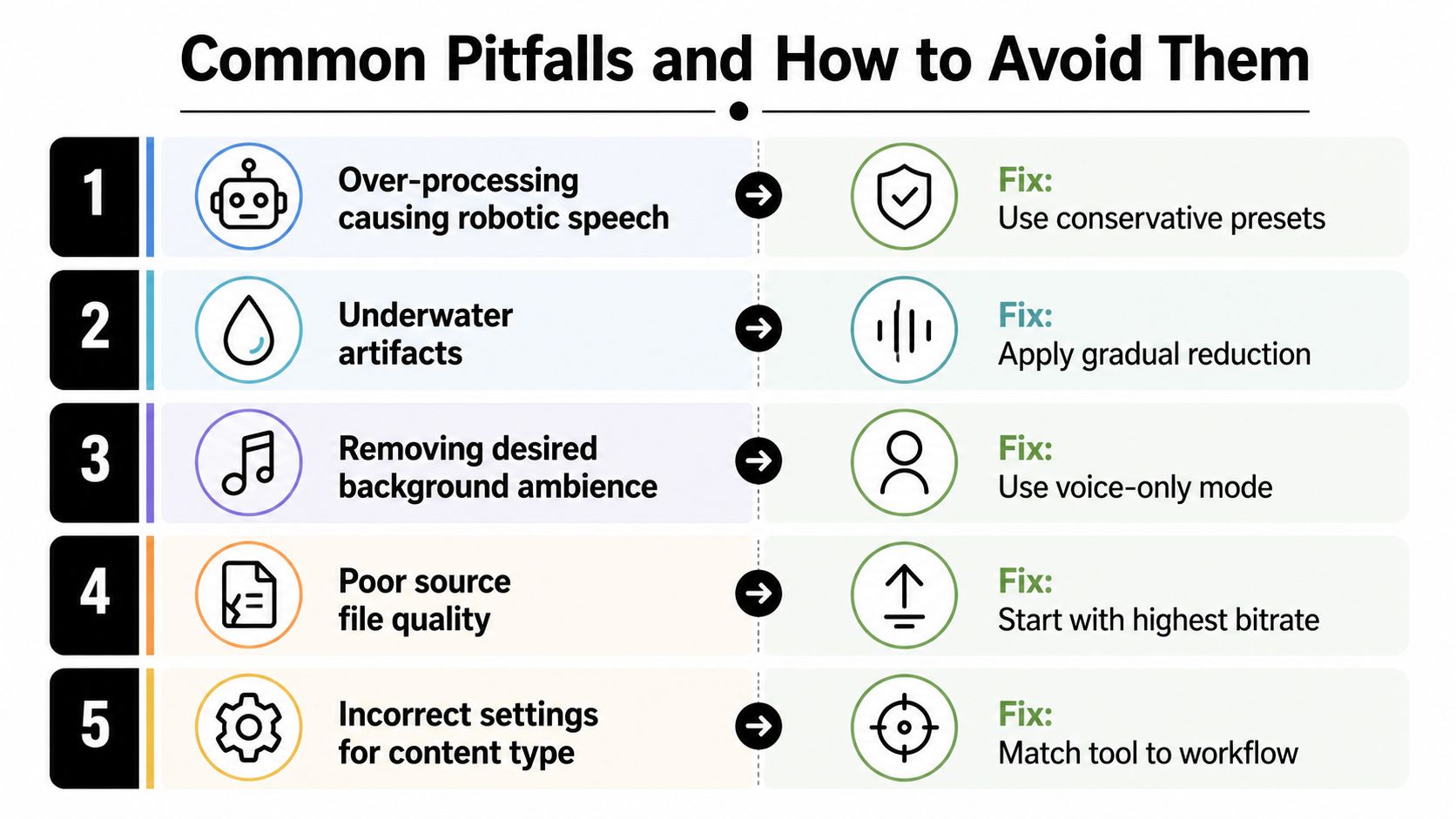
- Over-processing: If the voice becomes robotic, reduce the intensity before trying EQ. Metallic movement usually means the model has started treating speech texture as noise.
- Chasing underwater artifacts: Gradual reduction is safer than a single severe pass. Compare sustained vowels and fricatives, not only the gaps between sentences.
- Removing meaningful ambience: Room tone, laughter, and environmental detail can carry context. Isolate the voice only when the edit benefits from removing the surrounding scene.
- Ignoring source quality: Start from the cleanest available file and avoid repeated lossy exports. Restoration can't reliably recover detail that earlier compression has discarded.
- Using the wrong mode: Match the processing approach to the content. A live stream, an archival interview, and a vocal stem have different tolerance for latency and artifacts.
Stereo files deserve a specific check before using a mono-focused model. Channel imbalance, phase differences, or a poorly combined stereo image can create problems that noise reduction won't solve. Listen in mono, confirm that the voice remains stable, and decide whether the source should be treated as stereo or converted deliberately.
Validate the result in context
Confirmation bias is strong in restoration. After spending time on a processed version, people tend to defend it. Use level-matched A/B playback, label the files without revealing which is processed, and test the voice against the actual music, effects, and room tone used in the final edit.
Listening test: Check the first sentence, a quiet pause, a loud consonant, a breath, and the most difficult background event. Those moments reveal more than a continuous casual listen.
AI models also have boundaries. Overlapping speakers can confuse separation, extreme reverb can blur the direct signal beyond reliable recovery, and an already distorted recording may only become more intelligible, not natural. Treat the output as a carefully generated reconstruction, not proof that the original capture never happened.
Before export, check:
- Speech detail: Are “s,” “t,” and “k” sounds intact?
- Continuity: Does the room tone jump between phrases?
- Identity: Does the speaker still sound like the same person?
- Dynamics: Did compression or enhancement flatten the performance?
- Playback: Does it hold together on headphones and ordinary speakers?
Choosing the Right Tool and Settings
The right AI audio cleanup tool gives you control over intensity, source selection, and review. A single magic button is convenient for a demo, but production work needs a way to choose between speed and preservation.
Choose batch processing when a podcast network, archive, or enterprise team handles recurring files. Look for real-time preview when you need to tune a difficult interview by ear. API access matters when cleanup must connect to an existing transcription, media, or storage workflow. Local processing may suit confidential material, while a browser workflow can remove setup friction for independent creators.
Start conservatively. The brief's suggested 40 to 60 percent noise reduction strength is a practical starting range, but it isn't a universal rule, and no source is provided for treating it as a measured standard. Reduce until the distraction stops competing with speech, then stop before the voice loses its transients and breath sounds.
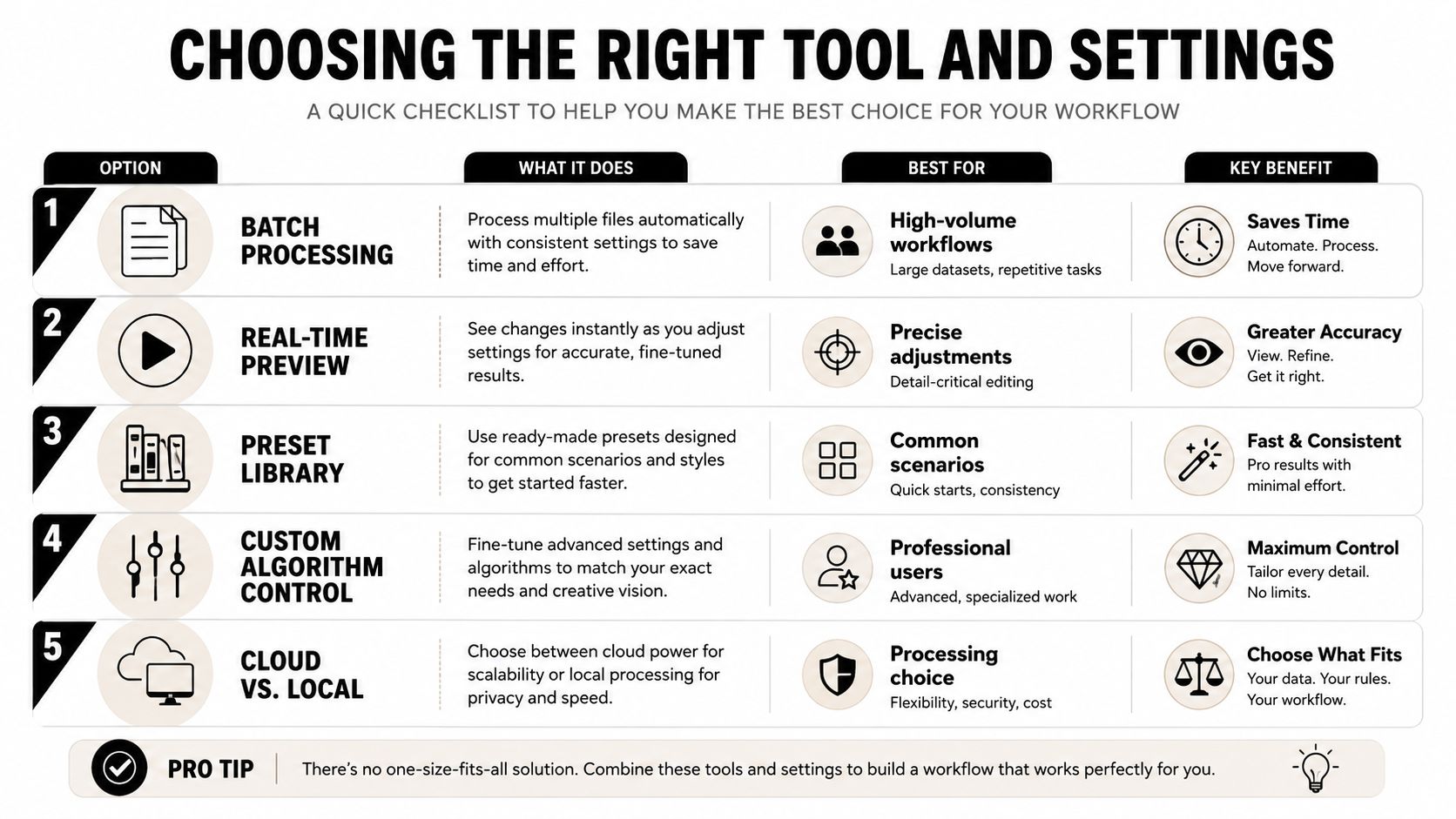
Judge processed audio in context, not only through solo playback. A little background texture may disappear once music and effects enter the mix, while an over-dry voice can remain obviously artificial. For recording advice before cleanup begins, a focused solo host recording software guide can help you improve the capture stage.
ClearAudio lets users upload audio or video, specify whether to keep speech, dialogue, vocals, music, or background music, and choose quality modes that range from faster processing to higher-quality options. Test one difficult clip in balanced mode, compare it with your current manual chain, and decide whether the saved time justifies the remaining artifact trade-off.
ClearAudio offers browser-based AI cleanup for noise, hum, hiss, room echo, dialogue isolation, and stem separation, with quality modes suited to quick tests or more demanding restoration. Upload a problematic clip, compare its balanced output with your existing workflow, and visit ClearAudio to start testing the difference.