
Voice isolation software separates a target voice from noise, music, or other speakers, so the spoken track becomes clean without re-recording. The category grew from a $1.37 billion market in 2024 to a projected $1.78 billion in 2025, according to industry market coverage of AI audio source separation.
You know the situation. A podcast interview contains a strong story, but a lawnmower runs through the entire conversation and a ceiling fan hum sits beneath every sentence. The guest has left, the recording can't be repeated, and ordinary volume controls only make the unwanted sounds louder.
Voice isolation gives that recording another path. Instead of asking you to rebuild the session, it analyzes the mixture, identifies the speech, and creates a cleaner version that can move into your editor, transcript workflow, or publishing pipeline. The technology has roots in audio source-separation research that emerged in the mid-1990s and expanded through the early 2000s, giving today's tools more than 30 years of research history in blind source separation, speech enhancement, and machine learning, as described in this overview of audio source separation.
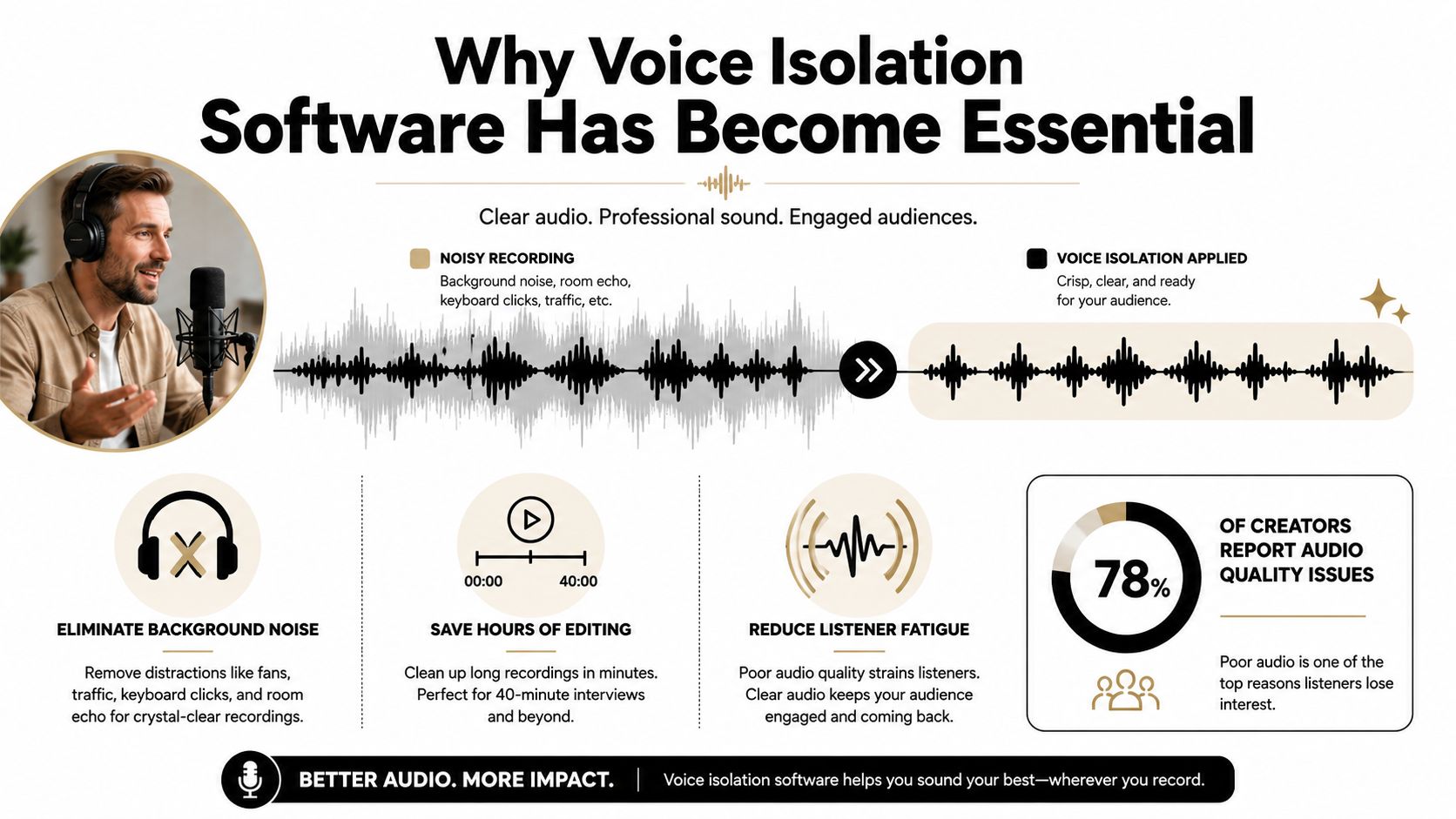
Table of Contents
- Why Voice Isolation Software Has Become Essential
- How Voice Isolation Software Actually Works
- Where Creators and Teams Use Voice Isolation
- Features Worth Comparing Before You Choose
- A Step-by-Step ClearAudio Workflow
- Privacy, Performance, and Pricing Trade-offs
- Practical Tips for the Best Results
Why Voice Isolation Software Has Become Essential
A useful recording can become difficult to publish for reasons unrelated to the speaker. A remote interview may contain room echo, an unstable microphone, keyboard clicks, and household noise. On-location video can add traffic, wind, air-conditioning, music bleed, or nearby conversations. In a meeting capture, several voices may overlap. At a concert, instruments and audience noise can mask the lead vocal.
Traditional noise reduction works well against a steady hum or hiss. It becomes less reliable when the unwanted sound changes, occupies the same frequencies as speech, or comes from another person. Voice isolation software takes a different approach: it preserves the chosen voice while reducing surrounding audio, instead of treating the entire recording as one block.
The recording you thought you had to abandon
A host records a long interview in a home office. The guest gives valuable answers, but a fan adds a low mechanical tone and outdoor work brings intermittent bursts through the window. An equalizer may reduce some low frequencies, while also making the guest's voice thin. A gate can mute pauses, yet it cannot tell a meaningful consonant from a passing noise.
Isolation can create a speech-focused track for the next stage of editing. The editor can then apply equalization, compression, and loudness control to a voice that no longer competes with the original background at every moment. For a non-editor, a prompt-based workflow can make the same choice more accessible: specify what to keep or remove in plain language, such as keeping the guest's speech and reducing the fan, traffic, or second speaker.
Practical rule: Treat isolation as a rescue and separation stage, not as a replacement for careful recording or final mastering.
The target also changes the workflow for music. Vocal removal reduces singing so the accompaniment can stand alone. Voice isolation aims to recover a vocal, dialogue track, or selected speaker. That choice determines the prompt, processing mode, and quality standard.
AI source separation has moved from research work toward everyday consumer use, helped by free browser tools and word-of-mouth distribution, according to market background on the category. Creators now meet damaged audio at the moment they need a practical fix, whether the next destination is an editor, transcript workflow, or publishing pipeline.
How Voice Isolation Software Actually Works
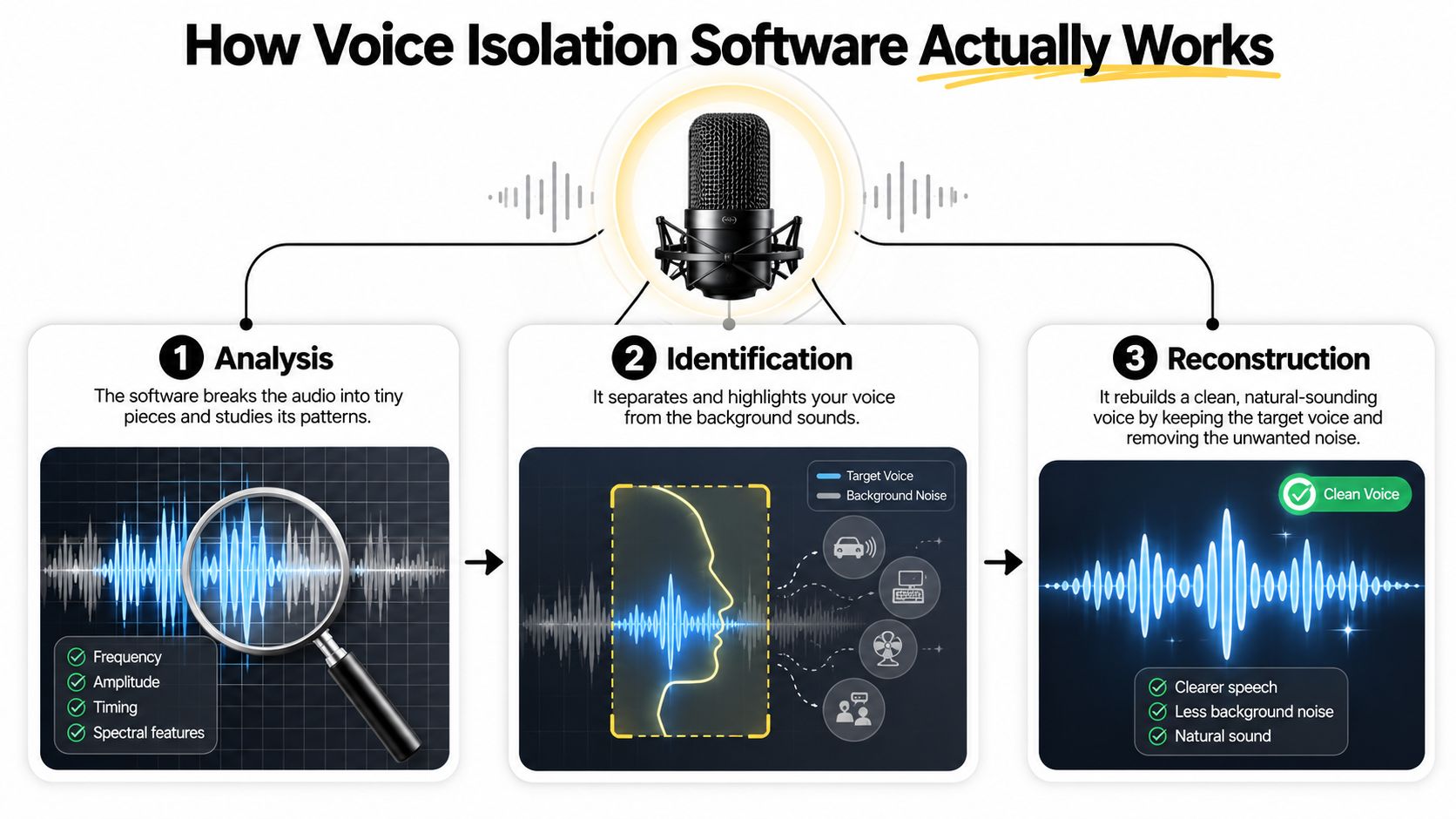
At its simplest, voice isolation software takes a mixed recording, identifies the acoustic pattern associated with the target voice, and reconstructs a new track with competing sounds reduced. Think of the original file as a crowded photograph. The software doesn't merely turn down the brightness of the whole image. It tries to trace the subject and rebuild the pixels around that subject with less distraction.
The model studies clues across time and frequency. Human speech has changing harmonics, consonant bursts, pauses, pitch movement, and rhythm. A fan has a different pattern. Music has another. A second speaker may resemble the target closely, which makes the task much harder.
From learned patterns to an audible result
Deep-learning systems learn from examples of speech mixed with other sounds. During training, the network compares a contaminated mixture with a cleaner target and learns which parts of the signal usually belong together. At use time, it estimates the target voice and generates a separated result.
Attention-based models add a useful listening strategy. Rather than treating every moment equally, they weigh the time slices and frequency regions that best explain the requested sound. The analogy is a reader marking the important phrases in a dense paragraph. The model looks for context, not just isolated volume peaks.
Researchers evaluate these systems with measures including SDR, SIR, SAR, and PESQ. SDR reflects recovery of the target source, SIR focuses on remaining interference, SAR captures introduced artifacts, and PESQ relates more closely to perceived speech quality. A Scientific Reports study of a CRNN-attention model reported improvements over baseline methods on the MIR-1K dataset, including a 0.17 gain in mean PESQ and a 0.15 gain in mean MOS-LQO for separated singing voice.
Those metrics help engineers compare systems, but your ears still decide whether the result works. A technically clean track can sound hollow, watery, metallic, or strangely over-smoothed if the model removes parts of the voice along with the background.
Quality modes change the trade-off
Many tools expose modes that behave like camera settings:
- Small is suited to quick checks and rough cleanup.
- Base offers a practical balance for routine work.
- PRO Large is intended for final podcast, music, or video output where detail matters.
- PRO Large-TV is tuned for stable dialogue intended to sit confidently in a broadcast-style mix.
Prompt-based systems add another layer of control. Instead of manually opening several stem controls, you can describe the intended result, such as “isolate the female host and reduce the audience.” Larger models usually require more computation, so buyers must choose between immediate previews and slower, higher-quality offline processing.
Where Creators and Teams Use Voice Isolation
The right workflow depends on what the recording contains and what the listener needs to hear. A solo podcaster may want a consistent speaking voice from a remote guest. A filmmaker may need dialogue separated from traffic while retaining enough location atmosphere to keep the scene believable. A producer working with a mixed song may care more about preserving reverb tails than removing every trace of accompaniment.
Independent podcasters often use lighter modes to inspect interviews, then reserve a higher-quality mode for the final episode. The important feature is consistency across guests. One guest may sound close and dry, while another speaks from a reflective room with a laptop microphone. A prompt can express the intended target without requiring the host to understand spectral editing.
Video creators face a wider range of problems. Dialogue isolation needs to preserve timing for lip sync and avoid making speech sound detached from the image. In multilingual work, test the actual languages and accents in your projects rather than assuming a tool handles every speaker equally. Research and market discussion also point to demand across call centers, hearing aids, and healthcare, where intelligibility and context can matter more than a polished musical tone, as outlined in this discussion of neural audio enhancement.
Music producers use isolation for a different reason. They may extract a lead vocal, reduce dialogue inside a sample, or separate a part for remixing. Reverb and delay create a special problem because the effect may belong to the voice but spread across the surrounding mix. Removing too aggressively can leave a dry, unnatural vocal with damaged tails.
Teams recording meetings, webinars, lectures, and customer calls usually prioritize intelligibility. Diarization, which determines who spoke when, can fail for different reasons than isolation, including overlapping speech, microphone variation, domain mismatch, and latency limits. SDBench research evaluates five diarization systems across 13 diverse datasets, reinforcing the need to test recordings that resemble your actual environment.
For live creators, real-time processing and API access are increasingly important expectations, while offline editing remains the more common focus of public guidance, as noted in market coverage of vocal remover technology. Streamers comparing cleanup tools can also consult this practical stream like a pro guide for broader production context.
| Audience | Typical Content | Recommended Quality Mode | Key Feature Need |
|---|---|---|---|
| Podcasters | Interviews and solo episodes | Small or Base for checks, PRO Large for delivery | Consistent speech cleanup |
| Video creators | Vlogs, field shoots, and tutorials | Base or PRO Large | Dialogue focus and lip-sync preservation |
| Music producers | Vocal extraction and remix stems | PRO Large | Reverb-tail and artifact control |
| Educators and corporate teams | Meetings, webinars, and lectures | Base or PRO Large-TV | Intelligibility and speaker handling |
| Localisation teams | Dialogue prepared for translation | PRO Large | Prompt control and repeatability |
Features Worth Comparing Before You Choose
A convincing demo doesn't guarantee a dependable production tool. Compare the features that affect your real recordings, then listen to the output on headphones and speakers. The strongest system on a single benchmark may not be the most reliable choice for your rooms, microphones, languages, or turnaround requirements.
Quality should include your ears
Start with objective measures such as SDR, SIR, SAR, and PESQ, but don't treat a score as a substitute for listening. Ask whether the isolated voice retains consonants, breath, pitch movement, and natural room presence. Listen for metallic ringing, watery textures, hollow vowels, and abrupt changes at word endings.
A useful trial should let you compare the original and processed files at matched loudness. If the cleaned version is louder, it may seem better for the wrong reason. Check a quiet sentence, a loud sentence, a pause, and a moment where the background overlaps speech.
Test the workflow, not just the model
Use this checklist while comparing products:
| Criterion | What to Test | Red Flag |
|---|---|---|
| Separation quality | Listen for target recovery, interference, and artifacts | A polished demo with no difficult audio |
| Language and accents | Process representative speakers and locations | No clear information about supported speech conditions |
| Real-time operation | Preview a live or near-live recording | Processing is too slow for the intended workflow |
| Offline processing | Submit a long, difficult file | No progress visibility or failed exports |
| Prompt control | Describe the speaker or sound to keep | Prompts produce vague or inconsistent results |
| File support | Check WAV, MP3, FLAC, and video needs | Required formats need conversion first |
| Export depth | Look for clean dialogue, residual, or stem options | Only one flattened output |
| Pricing | Compare pay-per-use, subscriptions, and trials | Trial hides important quality modes |
| Privacy | Read retention, deletion, and model-training terms | Unclear handling of uploaded recordings |
The distinction between real-time and offline processing deserves special attention. A live call may tolerate a quick, modest cleanup that keeps the conversation understandable. A finished documentary can justify slower processing if it produces a more natural voice and fewer artifacts.
Multilingual support also requires more than a language list. Test code-switching, accents, overlapping speakers, and music beneath speech. A system that performs well on one clean interview may behave differently in a field recording, so compare across acoustic conditions rather than relying on one headline result.
A Step-by-Step ClearAudio Workflow
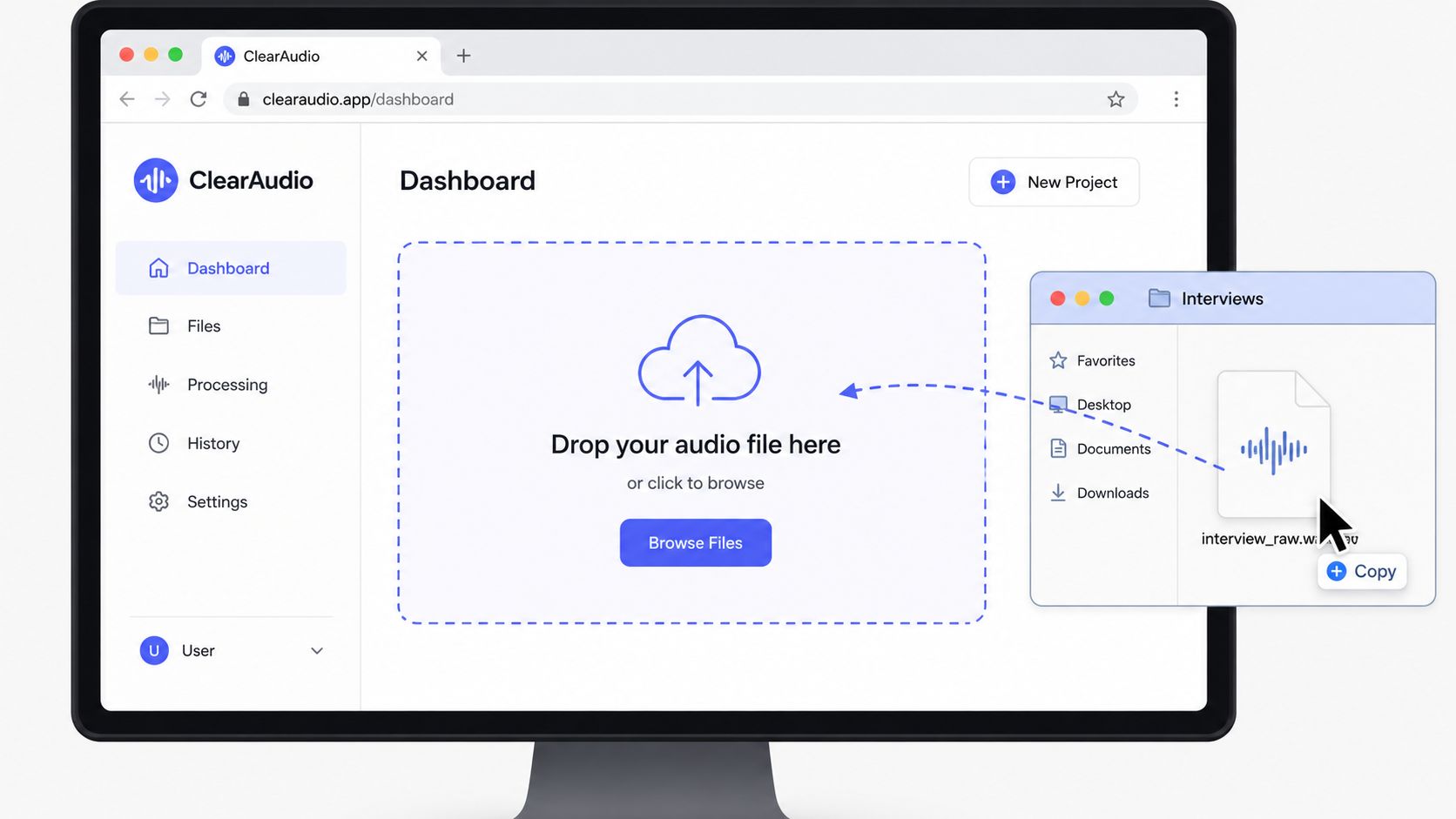
ClearAudio is designed around a browser workflow, so the process begins with the recording rather than a complicated session setup. Upload the raw file by dragging it into the interface, browsing for it, or using an available example. The source can be an audio file such as WAV, MP3, or FLAC, and the platform also supports video-oriented use cases.
Choose the mode before you process
Select the mode according to the job, not just the file length. Small works for a quick interview check. Base is appropriate when you need a balanced preview. PRO Large fits a final podcast, music stem, or demanding video cleanup, while PRO Large-TV suits dialogue that must remain steady under a broadcast-style mix.
The reason to preview first is simple. A difficult recording may reveal competing speakers, music bleed, or room reflections that require a more precise instruction. Processing the entire file before hearing a short sample can waste time and make diagnosis harder.
Tell the model what matters
Write the request in ordinary language. For example:
- "Keep the host voice only and suppress the live audience."
- "Isolate the dialogue and reduce traffic noise."
- "Keep the vocals, reduce the musical accompaniment, and preserve the vocal reverb."
- "Retain the speaker and remove the fan hum and room echo."
Specific prompts name both the target and the problem. “Make it better” gives the system little direction. “Keep the guest voice, reduce keyboard clicks, and preserve natural pauses” describes the editorial result more clearly.
Preview a short segment before committing to the full recording. If another speaker leaks through, narrow the prompt. If consonants disappear, choose a gentler mode or revise the instruction to prioritize natural speech. Once the sample works, process the complete file and download the result for your editor or publishing workflow.
This demonstration gives a visual sense of how a browser-based isolation workflow can fit between recording and editing:
The final step is editorial, not merely technical. Compare the isolated track against the original, check sync if it came from video, and then apply mastering adjustments. Isolation should create a usable source. It shouldn't be asked to perform every mix decision at once.
Privacy, Performance, and Pricing Trade-offs
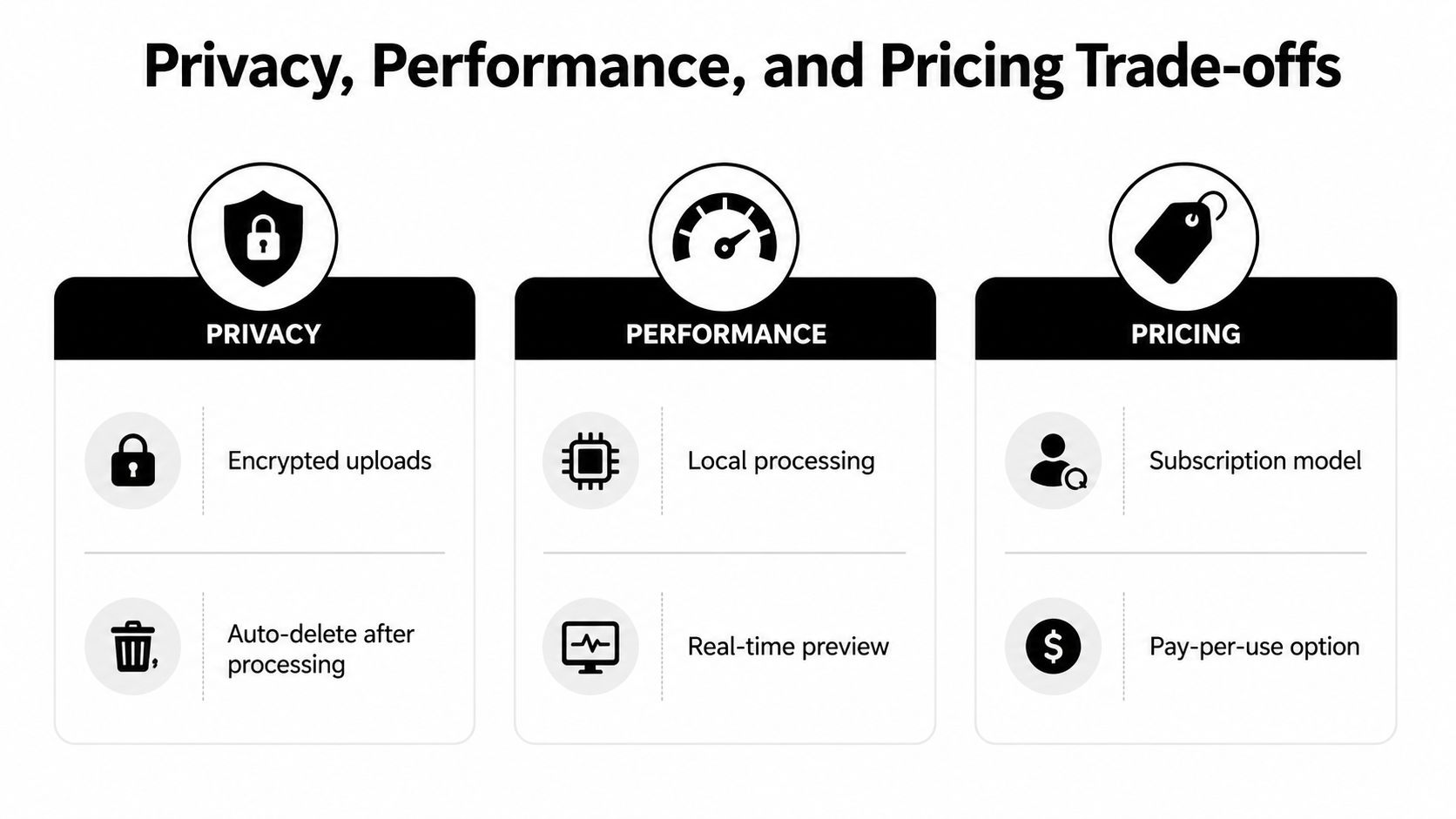
A voice isolation tool can sound excellent and still be the wrong choice if it conflicts with your production constraints. Evaluate the purchase across privacy, performance, and pricing, then decide which compromise your work can tolerate.
Privacy determines what you can upload
Unreleased interviews, legal recordings, customer calls, and internal meetings may need stronger controls than public content. Check whether uploads are encrypted in transit and at rest, how long files remain available, whether projects are automatically deleted, and whether the provider uses customer audio to train models.
Don't rely on a general security badge alone. Read the provider's actual policy and look for practical answers about retention and processing. The LunaBloom AI privacy overview is a useful example of the kind of policy document buyers should inspect before sending sensitive media to an online service.
Performance changes the shape of your day
Fast modes help when you're checking an interview, responding to a client, or monitoring a live workflow. Larger modes consume more computing resources but can be more appropriate for final delivery. Local processing may offer stronger control over sensitive files, while browser processing can reduce setup and make collaboration easier.
Real-time isolation creates another compromise. A live stream, call, or browser tool needs low latency, so the system can't spend unlimited time reconsidering every moment. Offline processing gives the model more room to analyze the recording, but it doesn't suit every deadline.
Pricing should match your volume
Occasional users may prefer pay-per-use pricing because they don't process audio continuously. Daily creators may find a subscription easier to budget, while larger teams may need shared seats, API access, support terms, or service-level commitments.
Build a small test set from your own work and estimate how often you'll process it. Check whether the trial includes the modes you'd use, whether exports are watermarked or limited, and whether failed jobs consume credits. The right price is the one that reflects your complete workflow, including review time and reprocessing, not just the visible processing fee.
Practical Tips for the Best Results
Start with the cleanest source you can capture. Place the microphone close enough to the speaker, reduce avoidable room noise, and monitor for clipping. Voice isolation can rescue a difficult recording, but it can't guarantee a natural result when the target is buried beneath another sound with similar timing and frequency.
Use the lightest mode that solves the problem. A quick interview cleanup may not need the largest model, while a final vocal extraction can justify more processing. Preview a short clip before sending a long file, especially when the recording includes overlapping voices or music.
Write prompts that describe the editorial decision. “Keep dialogue and reduce traffic” is more useful than “remove noise,” because it identifies the sound you want and the sound you don't. If the audience is part of the scene, ask for dialogue isolation while preserving some atmosphere rather than demanding a completely silent background.
Keep isolation separate from mastering
Process the voice first, then adjust equalization, compression, de-essing, and loudness. Combining every correction at once makes it difficult to tell whether a problem came from the separation model or the mastering chain.
Listen for the common warning signs:
- Metallic tone: Reduce processing strength or try a larger, more suitable mode.
- Missing consonants: Rewrite the prompt to prioritize natural speech and inspect the source segment.
- Pumping background: Compare a lighter setting and check whether the room tone should remain.
- Detached dialogue: Preserve some ambience when the visual scene depends on location.
- Leaking speakers: Test a more specific prompt and review diarization or speaker-selection controls.
The best voice isolation software is the one that gets a creator to publish-ready audio without requiring them to become an audio engineer. You still need to listen critically, but the tool should make the useful decision easy to express and the result easy to review.
ClearAudio lets you upload audio or video in the browser, specify what to keep with a plain-language prompt, and choose from Small, Base, PRO Large, and PRO Large-TV quality modes for different cleanup needs. Visit ClearAudio to test a voice-isolation workflow on a difficult recording, preview the result, and decide whether it fits your next episode or edit.